NEWDuroBox – Fanless workshop PC with Bowmonk MTS pre-installed. Free remote setup.    Learn more →
Bowmonk Connected MTS

Get help with Bowmonk Connected

Answer a few quick questions and we’ll point you in the right direction – whether that’s a free support call, a remote installation, or a quick fix you can do yourself.

Free support calls Remote installations DVSA compliantUK team
Paid - Remote Installation

Book a Remote Installation

Our team will connect to your computer remotely and set up Bowmonk Connected from scratch, including the DVSA connection code.

Most installations take around 30 minutes.
£40 + VAT - payment is required to confirm your booking. You will be taken to checkout after choosing a time.
Book Remote Installation →

Need to get in touch another way? Visit our contact page

Paid - Remote Setup

Book a Remote Setup

Our team will connect remotely and set up your new brake tester with Bowmonk Connected.

We will make sure the device is recognised and test results are submitting correctly.
£40 + VAT - payment is required to confirm your booking. You will be taken to checkout after choosing a time.
Book Remote Setup →

Need to get in touch another way? Visit our contact page

How to use Bowmonk Connected

Watch our video guides

These short videos walk you through everything you need to know.
How to submit brake test results
How to use the BrakeCheck
How to use the Tapley EBM
Need more detail? The full user guide covers every feature step by step.
Read the user guide →

If you still need help after watching the videos and reading the guide, you can book a free call with our team.

Book free walkthrough call →

Note: if the call results in a full installation, there is a £40 + VAT charge.

Need to get in touch another way? Visit our contact page

Free Support Call

Book a free support call

No problem - our team will work out what is going on and get it sorted for you. The call is free.
Before booking: Many issues can be resolved by following the steps in our user guide.
Read the user guide first →
If the guide doesn't help, book a free support call below. Note: if the call results in a full installation, there is a £40 + VAT charge.
Book Free Support Call →

Need to get in touch another way? Visit our contact page

Paid - Remote Installation

You need a Remote Installation

Our team will connect to your new computer remotely and set up Bowmonk Connected from scratch, including the DVSA connection code.

Most installations take around 30 minutes.
£40 + VAT - payment is required to confirm your booking. You will be taken to checkout after choosing a time.
Book Remote Installation →

Need to get in touch another way? Visit our contact page

Paid - Remote Installation

Book a remote installation

If you are not sure whether Bowmonk Connected was set up on your new computer, the safest option is to book an installation.

Our team will check and set everything up. If it turns out no install is required, we will refund you in full.
£40 + VAT - payment is required to confirm your booking. You will be taken to checkout after choosing a time.
Book Remote Installation →

Need to get in touch another way? Visit our contact page

Paid - Remote Installation

You need a Remote Installation

If Bowmonk Connected has never worked on this computer, it needs to be set up properly from scratch.

Our team connects remotely and handles everything.
£40 + VAT - payment is required to confirm your booking. You will be taken to checkout after choosing a time.
Book Remote Installation →

Need to get in touch another way? Visit our contact page

Paid - Remote Installation

Install on your other computer

The error on your current computer means Windows has become damaged. Bowmonk Connected needs to be installed on your other machine instead.
£40 + VAT - payment is required to confirm your booking. You will be taken to checkout after choosing a time.
Book Remote Installation →

Need to get in touch another way? Visit our contact page

Paid - Remote Installation

A replacement computer is needed first

The current computer cannot be used to install Bowmonk Connected.

We suggest our DuroBox PC which is certified for use with Bowmonk Connected and comes with free remote setup.

View the DuroBox product page

Once you have a computer, book a Remote Installation and we will set everything up.
£40 + VAT - payment is required to confirm your booking. You will be taken to checkout after choosing a time.
Book Remote Installation →

Need to get in touch another way? Visit our contact page

Free Support Call

Book a free support call to discuss options

The current computer cannot run Bowmonk Connected. Our team can talk you through your options on a free call.
Before booking: Many issues can be resolved by following the steps in our user guide.
Read the user guide first →
If the guide doesn't help, book a free support call below. Note: if the call results in a full installation, there is a £40 + VAT charge.
Book Free Support Call →

Need to get in touch another way? Visit our contact page

Free Support Call

Book a free support call - connection code setup

The connection code from the DVSA is not set up, which is why Bowmonk Connected cannot connect.

Our team can sort this out for you on a free remote call.
Before booking: Many issues can be resolved by following the steps in our user guide.
Read the user guide first →
If the guide doesn't help, book a free support call below. Note: if the call results in a full installation, there is a £40 + VAT charge.
Book Free Support Call →

Need to get in touch another way? Visit our contact page

Free Support Call

Book a free support call - internet setting

A change to your internet connection is the likely cause. Our team can check and change one internet setting on your computer remotely.

The call is free.
Before booking: Many issues can be resolved by following the steps in our user guide.
Read the user guide first →
If the guide doesn't help, book a free support call below. Note: if the call results in a full installation, there is a £40 + VAT charge.
Book Free Support Call →

Need to get in touch another way? Visit our contact page

Free Support Call

Book a free support call

Your connection code is set up and your internet hasn't changed, but something else is stopping the connection.

Our team will investigate remotely at no charge.
Before booking: Many issues can be resolved by following the steps in our user guide.
Read the user guide first →
If the guide doesn't help, book a free support call below. Note: if the call results in a full installation, there is a £40 + VAT charge.
Book Free Support Call →

Need to get in touch another way? Visit our contact page

Free Support Call

Book a free support call

If you are not sure whether the internet has changed, our team can check for you remotely. The call is free.
Before booking: Many issues can be resolved by following the steps in our user guide.
Read the user guide first →
If the guide doesn't help, book a free support call below. Note: if the call results in a full installation, there is a £40 + VAT charge.
Book Free Support Call →

Need to get in touch another way? Visit our contact page

Try This First

The order matters - plug in first, then open the programme

Every time, do it in this order:

1. Plug the brake tester cable into the computer
2. Hold the power button until 'Sbr' shows on the screen
3. Then open Bowmonk Connected

Need to get in touch another way? Visit our contact page

Free Support Call

Other software may be blocking the connection

Close all other garage programmes, unplug the brake tester, wait 10 seconds, plug it back in, switch it on, then open Bowmonk Connected.

If it still doesn't work, book a free call.
Before booking: Many issues can be resolved by following the steps in our user guide.
Read the user guide first →
If the guide doesn't help, book a free support call below. Note: if the call results in a full installation, there is a £40 + VAT charge.
Book Free Support Call →

Need to get in touch another way? Visit our contact page

Free Support Call

Book a free support call

Our team can check your computer remotely and see if anything is blocking the connection. The call is free.
Before booking: Many issues can be resolved by following the steps in our user guide.
Read the user guide first →
If the guide doesn't help, book a free support call below. Note: if the call results in a full installation, there is a £40 + VAT charge.
Book Free Support Call →

Need to get in touch another way? Visit our contact page

Check This First

Your replacement cable may be the problem

Cables bought online are very often 'charging only' and cannot transfer data. Only a data-capable USB cable will work.

Try the original Bowmonk cable if you still have it.

Buy an official replacement cable

Need to get in touch another way? Visit our contact page

Free Support Call

Book a free support call

The most common cause is a driver that needs updating. Our team can fix this remotely in most cases. The call is free.
Before booking: Many issues can be resolved by following the steps in our user guide.
Read the user guide first →
If the guide doesn't help, book a free support call below. Note: if the call results in a full installation, there is a £40 + VAT charge.
Book Free Support Call →

Need to get in touch another way? Visit our contact page

Quick Fix

Log out of the DVSA site first, then send results

Do it in this order every time:

1. Log out of the DVSA testing website
2. Submit the results in Bowmonk Connected
3. Wait for the success message
4. Then log back into the DVSA site

Need to get in touch another way? Visit our contact page

Free Support Call

Book a free support call

You're following the right process but results still aren't appearing. Our team will investigate remotely. There is no charge.
Before booking: Many issues can be resolved by following the steps in our user guide.
Read the user guide first →
If the guide doesn't help, book a free support call below. Note: if the call results in a full installation, there is a £40 + VAT charge.
Book Free Support Call →

Need to get in touch another way? Visit our contact page

No Booking Needed

The results have expired

Test results are only valid for roughly one hour. The tests will need to be done again.

Submit the results straight afterwards next time.
TimeSync Appointment

The clock inside the brake tester needs resetting

When the battery is changed or the unit is returned from calibration, the internal clock resets.

Our team can connect remotely and fix this.
£10 + VAT - payment is required to confirm your booking. You will be taken to checkout after choosing a time.
Book TimeSync →

Need to get in touch another way? Visit our contact page

Free Support Call

Book a free support call

Results within the time limit shouldn't be showing as expired. Our team will check remotely at no charge.
Before booking: Many issues can be resolved by following the steps in our user guide.
Read the user guide first →
If the guide doesn't help, book a free support call below. Note: if the call results in a full installation, there is a £40 + VAT charge.
Book Free Support Call →

Need to get in touch another way? Visit our contact page

How to use Bowmonk Connected

Watch our video guides

These short videos walk you through everything you need to know.
How to submit brake test results
How to use the BrakeCheck
How to use the Tapley EBM
Need more detail? The full user guide covers every feature step by step.
Read the user guide →

If you still need help after watching the videos and reading the guide, you can book a free call with our team.

Book free walkthrough call →

Note: if the call results in a full installation, there is a £40 + VAT charge.

Need to get in touch another way? Visit our contact page

Free Support Call

Book a free support call - missing icon

Windows updates can sometimes remove the Bowmonk Connected shortcut. Our team can get it back quickly on a free remote call.
Before booking: Many issues can be resolved by following the steps in our user guide.
Read the user guide first →
If the guide doesn't help, book a free support call below. Note: if the call results in a full installation, there is a £40 + VAT charge.
Book Free Support Call →

Need to get in touch another way? Visit our contact page

Send Unit to Bowmonk

The brake tester needs to come to us

This error cannot be fixed remotely. Please send the unit to:

Bowmonk Ltd
Diamond Road
Norwich
NR6 6AW

Include a note saying "Disabled for ServiceBrake/HandBrake."

Need to get in touch another way? Visit our contact page

Free Support Call

Book a free support call

No problem - our team will talk through what is happening and get it sorted remotely. There is no charge for support calls.
Before booking: Many issues can be resolved by following the steps in our user guide.
Read the user guide first →
If the guide doesn't help, book a free support call below. Note: if the call results in a full installation, there is a £40 + VAT charge.
Book Free Support Call →

Need to get in touch another way? Visit our contact page

Need a reliable computer for your garage?

Certified for Bowmonk Connected

The DuroBox is a fanless, rugged PC purpose-built for MOT workshops. It ships with Windows 11 Pro and Bowmonk Connected pre-installed. Our technicians handle DVSA site key setup, equipment pairing, and commissioning remotely – so you are compliant and operational with zero IT skills required.
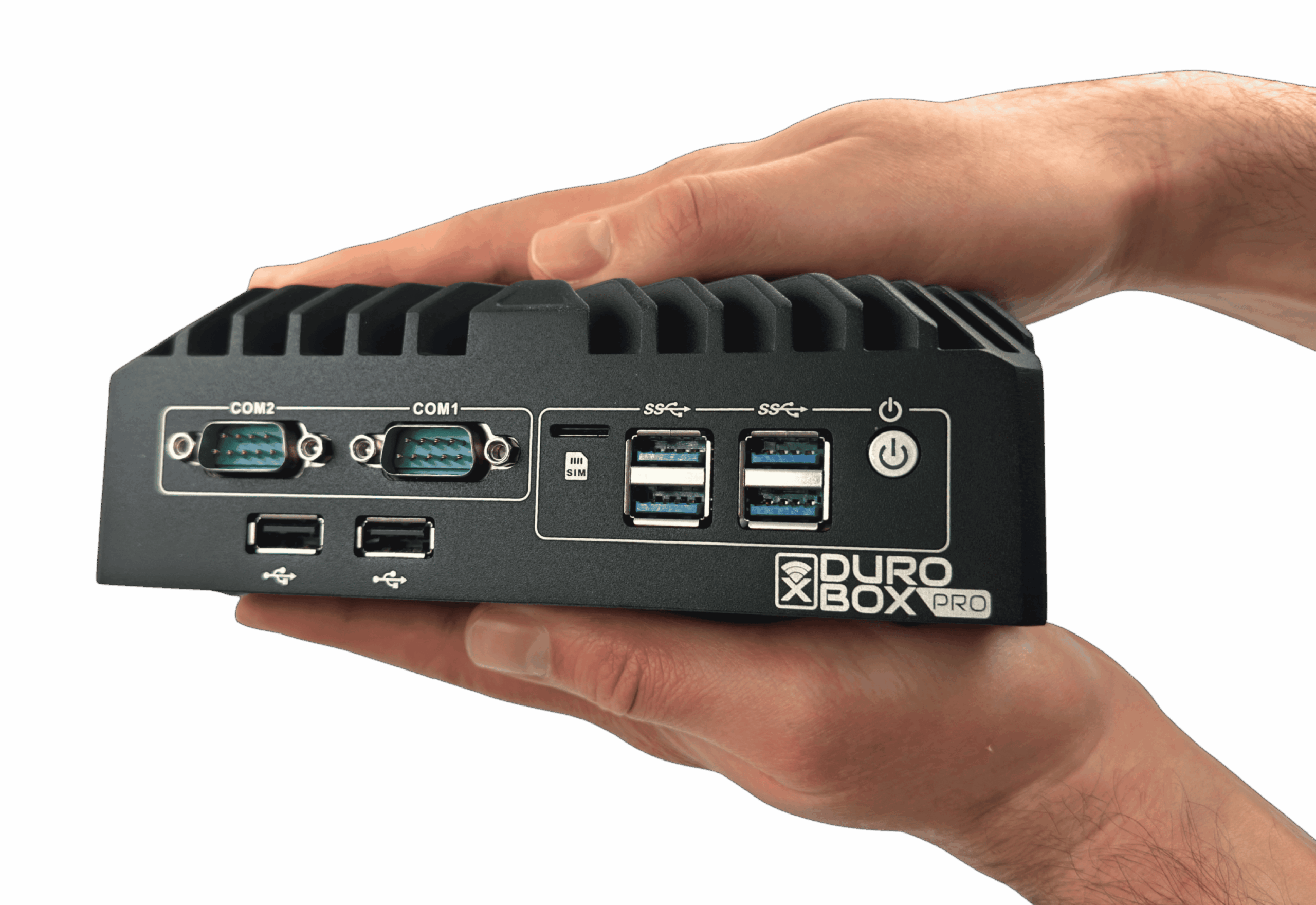
✓ Free remote setup✓ DVSA compliant✓ Fanless ✓ 2-year warranty

From £695 ex VAT – Standard Kit from £875 ex VAT

Quick links

Download software

Latest Bowmonk Connected installer, user guide, and release notes.

Download page →

Replacement cables

Official Bowmonk USB data cables for BrakeCheck and Tapley EBM.

Shop cables →

Register your device

Register your BrakeCheck or Tapley EBM for warranty and calibration reminders.

Register →